tell application "Reminders"
	#选择默认的list
	tell default list
		# 获取当前时间
		set theCurrentDate to current date
		# 把初始时间改为当天晚上8点左右
		set fromDate to theCurrentDate + 0 * days + 1 * minutes + 3 * hours
		set endDate to fromDate + 5 * minutes
		# 第一次间隔1天
		set from2 to fromDate + 1 * days

		# 第2次间隔2天
		set from3 to fromDate + (1 + 2) * days

		# 第3次间隔4天
		set from4 to fromDate + (1 + 2 + 4) * days

		set from5 to fromDate + (1 + 2 + 4 + 7) * days

		set from6 to fromDate + (1 + 2 + 4 + 7 + 15) * days

		set descript to "oc04-arc"
		# 字符串拼接使用&
		set descript15 to descript & "15"

		make new reminder with properties {name:descript, due date:fromDate}
		make new reminder with properties {name:descript, due date:from2}
		make new reminder with properties {name:descript, due date:from3}
		make new reminder with properties {name:descript, due date:from4}
		make new reminder with properties {name:descript, due date:from5}
		make new reminder with properties {name:descript15, due date:from6}

	end tell
end tell
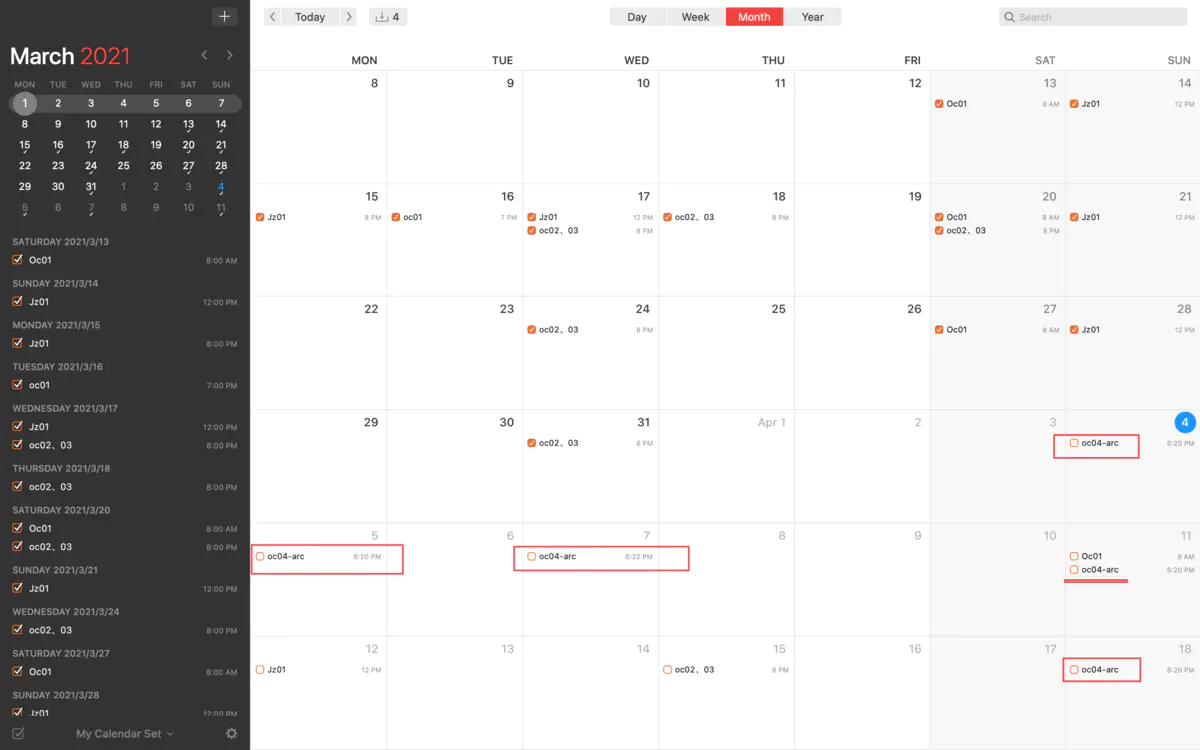
效果
如图是执行脚本之后,自动生成的计划。 图中的oc01, jz01是我上个月手动加的。
todo
首次复习设为当天晚上8点。期望是取今天的日期,并设时间为20:00。 但是目前只能用 current date。包含了时分秒,不知道怎么把时、分删除。 查了script的语法,只能取其字符串,但是这样就无法+1天操作了。 于是就用当前的时间,计算+几个小时,获得当天晚上8点的时间。